

Quick answer: how do I make an Ozil AI video?
To make an Ozil AI video, sign in to OzilAi, upload one clear full-body photo, choose your preferred export settings (10-second quick take or 15-second full cut, 720P or 2K), and submit. No complicated video editing or prompt engineering is required. The dedicated OzilAi pipeline automatically maps your facial landmarks, hairstyle, and outfit onto the viral 2016 Champions League solo goal—complete with the chip over the keeper, two defenders sliding past, and authentic stadium audio.
Jump directly into the OzilAi Video Creator or explore our Ozil AI Video Template to start, or follow this step-by-step guide to achieve the cleanest, most viral render on your first try.
What is the Ozil AI goal trend?
The viral trend recreates Mesut Özil's legendary 87th-minute winner for Arsenal against Ludogorets on November 1, 2016, in the UEFA Champions League. Down 2-0 early, Arsenal battled back to 2-2 before Özil produced what he later called the greatest goal of his entire professional career: he lofted a delicate chip over the rushing goalkeeper, took a composed touch, executed an audacious dummy that sent two sliding defenders skidding onto the turf, and slotted the ball cleanly into the empty net.
In late 2026, social media creators on TikTok, Instagram Reels, and YouTube Shorts began replacing Özil with everyday people, celebrities, suit-wearing businessmen, and fictional characters. The sheer comedic contrast of ordinary folks pulling off world-class soccer footwork turned "how to make ozil ai video" into an overnight viral phenomenon.
To make an authentic recreation, your clip needs to preserve all five distinct beats of the play:
| Beat | Timestamp | On-Pitch Action | What Makes It Iconic |
|---|---|---|---|
| Beat 1 | 0 to 2 s | Goalkeeper charges off his line | High-intensity sprint toward the edge of the penalty box |
| Beat 2 | 2 to 4 s | The delicate chip over the keeper | Ball floats gracefully over the diving goalie |
| Beat 3 | 4 to 7 s | Bounce control inside the box | Composed first touch to settle the descending ball |
| Beat 4 | 7 to 12 s | The double defender slip | Fake shot dummy sends two defenders sliding past on the grass |
| Beat 5 | 12 to 15 s | Rolling finish into the empty net | Calm, effortless side-foot roll followed by quiet celebration |
Many free filters cut off after Beat 2 (around 5 seconds), completely missing the double defender slide. The sliding defenders in Beat 4 are precisely why people share this clip.
Preview the full 15-second Ozil AI finish
Watch our full 15-second render below. Notice how the subject's tailored suit, facial identity, and footwear remain consistent while the ball physics, defender tackles, and authentic roar of the stadium crowd remain perfectly intact:
Three ways to make an Ozil AI video: pros and cons
Creators exploring how to make an Ozil AI video typically encounter three methods. Understanding their trade-offs will save you time and render credits.
1. Free CapCut templates
- How it works: Search "Ozil AI goal" on TikTok, tap a post using the CapCut template, insert your portrait, and export.
- Pros: 100% free; quick 30-second turnaround.
- Cons: Cuts off abruptly at 5 to 6 seconds right after the goalkeeper chip; only swaps the face onto the original player body with noticeable edge seam lines; lacks the crucial defender-sliding climax.
2. General text-to-video prompts (Dreamina, Kling, Runway)
- How it works: Write extensive prompts describing stadium floodlights, a midfielder chipping a keeper, and camera trajectories.
- Pros: Highly customizable scene aesthetics and camera angles.
- Cons: Severe hallucination risks. The ball frequently warps or teleports, defenders sprout extra limbs, and generating the exact sequence of two sliding defenders requires dozens of expensive failed attempts.
3. Purpose-built OzilAi creator (Recommended)
- How it works: Upload a single photo in the OzilAi Creator. Our neural pipeline uses motion transfer anchors specifically trained on the 2016 broadcast footage.
- Pros: Delivers the complete 15-second 5-beat sequence; transfers your full outfit (suits, hoodies, or jerseys); includes pre-synced multi-channel stadium sound.
- Cons: Requires standard render credits for HD exports.
| Feature Comparison | CapCut Free Template | Generic AI Video Prompt | OzilAi Creator |
|---|---|---|---|
| Video Duration | 5-6 seconds (Truncated) | Variable (5-10s) | Full 15 seconds |
| Includes Sliding Defenders | ❌ No | ⚠️ Rare / Unstable | ✅ Yes (Exact timing) |
| Whole-Body Attire Transfer | ❌ Face only | ⚠️ Inconsistent | ✅ Full outfit & footwear |
| Audio Integration | Generic music bed | ❌ Silent / Manual sync | ✅ Pre-synced crowd roar |
| Setup Complexity | Zero | Very High | Zero (1-click upload) |
Step-by-step: how to make ozil ai video with OzilAi
Creating your viral clip takes less than two minutes from start to finish.
Step 1: Pick the right photo
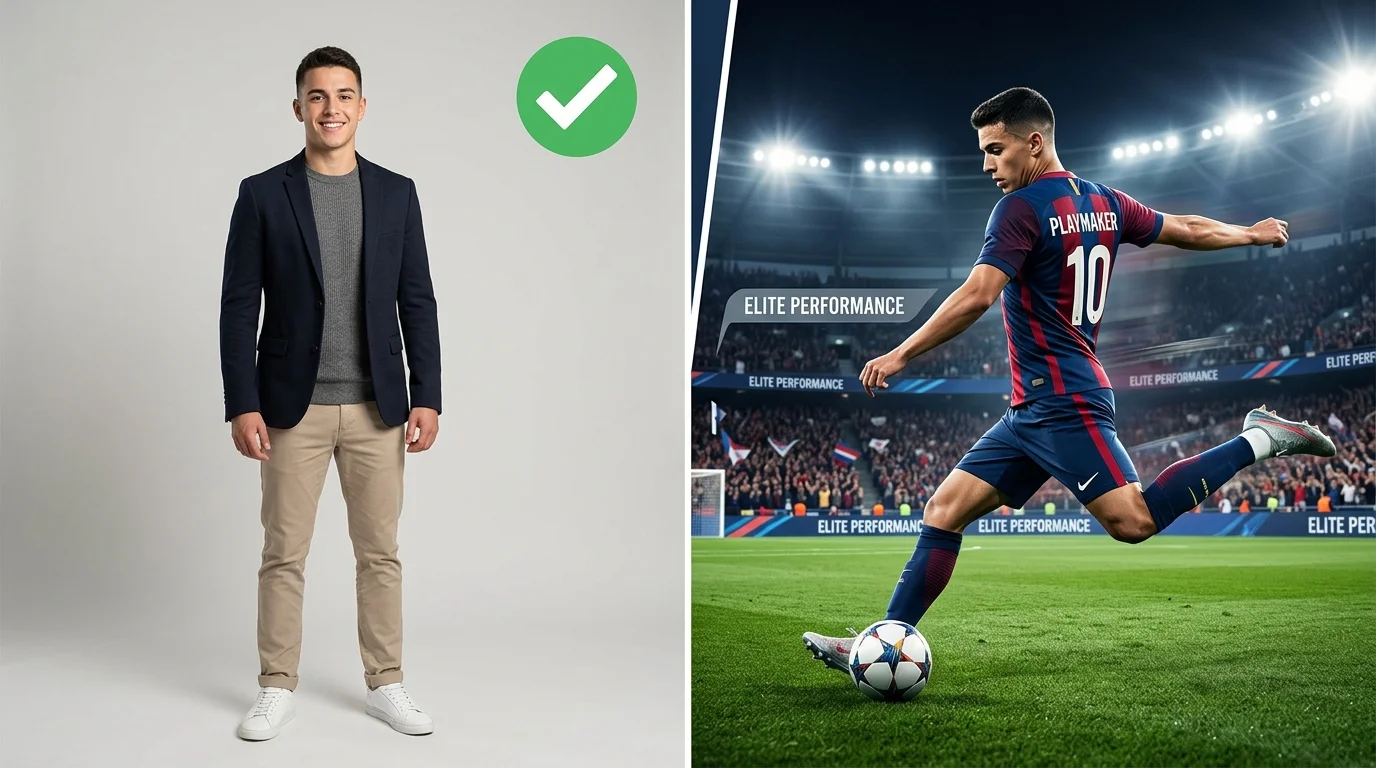
Your input image establishes the subject's face, body proportions, and outfit. Choosing an optimal photo prevents uncanny glitches:
- Full-body or three-quarter view: Ensure the head, torso, legs, and shoes are clearly visible.
- Unobstructed facial features: Both eyes, eyebrows, and the mouth should be sharp and unobstructed. Avoid dark sunglasses, heavy shadows, or hats that cast shadows over the forehead.
- Contrast wardrobe: Wearing everyday street clothing, tailored business suits, or vintage soccer kits creates the viral humor that drives views on TikTok and Instagram.
Step 2: Upload to OzilAi studio
Navigate to the OzilAi Creator. Drag and drop your photo into the upload dropzone. Our automatic validation pre-checks your image for resolution, lighting balance, and face detection in real time.
Step 3: Select duration and resolution
- Duration: Choose between the 10-second quick take or the full 15-second cut (recommended for TikTok and YouTube Shorts to experience all 5 beats including the sliding defenders).
- Resolution: Select 720P for fast mobile generation or 2K Ultra HD for crystal-clear social sharing.
Step 4: Generate and export
Click Generate Video. The task enters the processing queue, where facial landmarks, body geometry, and the ball trajectory are synthesized. Once completed, preview your generation with sound directly in the web browser, then download the MP4 file ready for posting.
Tips for maximizing viral reach on TikTok and Instagram Reels
- Leverage audio pairing: Post with the pre-synced stadium roar, or pair the video with trending TikTok sounds (such as phonk beats or dramatic classical operatic music) right at Beat 4 when the defenders slide.
- Hook in the first 2 seconds: Use on-screen text overlays like "When they say you can't play soccer in a suit..." or "Me entering the Champions League on 2 hours of sleep".
- Credit and label: Keep the content fun and engaging. Label your post with
#OzilAI,#OzilTrend, and#SoccerAIto ride the algorithmic wave.
Frequently asked questions
Can I make the video if I only have a selfie?
Yes, but a full-body photo produces significantly higher realism. If you upload a selfie or headshot, the model generates an adaptive soccer kit or default neutral athletic attire for the lower body. For custom clothing (such as tuxedos or streetwear), provide a full-body photo.
Does the exported video include the sliding defenders?
Yes! Unlike truncated CapCut templates, our dedicated pipeline processes the entire 15-second timeline so the two defenders sliding across the pitch are fully rendered.
How do I prevent face distortion during fast camera turns?
Make sure your source photo has even, natural illumination. Avoid harsh side-lighting, extreme low-light selfies, or heavy beauty filters, as these obscure the facial landmarks needed for 3D perspective tracking.
Are generated clips free of watermarks?
Yes, 100% watermark-free. Videos generated with OzilAi credits export cleanly without any platform watermarks, rendered in full 9:16 vertical format ready for immediate publishing on TikTok, Instagram Reels, and YouTube Shorts. Please note that OzilAi only accepts single still photos or images as input (video uploads are not supported). For the best result, make sure your uploaded photo does not contain pre-existing third-party watermarks.
Explore more creation tools
- Visit the OzilAi Video Creator to make your video now.
- Explore our Pricing and Credit Packs for flexible generation options.
- Read more about AI video trends in the OzilAi Blog.